How to Stop Custom Alerts
Unsubscribe from Custom Alerts, the emails Wire sends you when new content matches your saved searches, or turn off email for a single saved search while keeping the rest. You can do this from the email itself or from your account settings.
Only want fewer emails, not none?
Skip to Stop Email for One Saved Search. Unsubscribing from a Custom Alerts email stops all of them.
Before You Begin
You will need either:
- A recent Custom Alerts email, or
- Access to your Wire account settings at https://wire.pluckyworks.org/settings/
You do not need to be signed in to use the unsubscribe link in an email.
Instructions
Unsubscribe from a Custom Alerts Email 
Warning
Unsubscribing from a Custom Alerts email stops all Custom Alerts, not just the search that prompted you to unsubscribe. Your saved searches themselves are kept. You can turn Custom Alerts back on later from your account settings.
-
Open a recent Custom Alerts email and click Unsubscribe from Custom Alerts at the foot of the message.
Some email programs, including Gmail and Apple Mail, also show their own Unsubscribe control near the sender's name. Either one works.
-
On the page that opens, headed Stop Custom Alerts?, click Confirm unsubscribe.
-
Confirm you see You're unsubscribed.
Turn Off Custom Alerts in Account Settings 
Use this route if you no longer have a Custom Alerts email to hand, or if the link in your email has expired.
-
Open your account settings at https://wire.pluckyworks.org/settings/.
-
Go to the Email Preferences section.
-
Turn off Custom Alerts.
Stop Email for One Saved Search
Use this route to keep getting Custom Alerts, but drop one search from them.
-
Go to the Search page at https://wire.pluckyworks.org/search/.
-
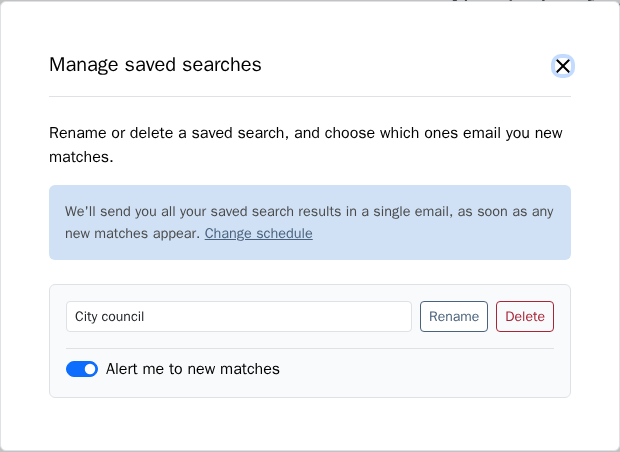
Click Manage next to the Saved searches... dropdown at the top of the Filter panel.
A modal (a pop-up window) titled Manage saved searches opens.
-
Find the card for the saved search and turn off Alert me to new matches.
The change saves as soon as you make it.
What Happens Next
- Wire stops sending Custom Alerts from the next scheduled send onward. An email already being prepared when you unsubscribe may still arrive.
- Your saved searches are kept. You can still open and re-run every one of them in Wire.
- The per-search Alert me to new matches settings are kept too, so turning Custom Alerts back on restores your previous selection rather than starting from scratch.
- Your delivery schedule (Immediately, Once a day, or Once a week) is kept as well. The schedule options are hidden while Custom Alerts are off and come back, with your previous choice, when you turn them on again.
- Nobody else at your Outlet or Group is affected. These settings apply only to you.
To start receiving Custom Alerts again, turn Custom Alerts back on in your account settings.
Next Steps
- Set up Custom Alerts if you want to turn them back on
- Manage your account to review your other email preferences
Troubleshooting
-
"This unsubscribe link isn't valid": Unsubscribe links expire. Open your most recent Custom Alerts email and use the link there, or turn Custom Alerts off in your account settings instead. See Turn Off Custom Alerts in Account Settings.
-
I clicked unsubscribe and still got one more email: An email already in preparation when you unsubscribed can still be delivered. If emails continue past that, check that Custom Alerts is off in your account settings.
-
I only wanted to stop one search: Turn Custom Alerts back on in your account settings, then turn off Alert me to new matches for that one search. See Stop Email for One Saved Search.
-
I can't find the unsubscribe link in the email: Look at the foot of the email for Unsubscribe from Custom Alerts. If your email program hides long messages, expand the message first, or use your account settings instead.
-
Still stuck? Contact your Group administrator for membership and permission issues, or email support@pluckyworks.org for technical problems.